
Learn how enterprises can uncover hidden Azure cloud waste, reduce unnecessary costs, right-size workloads, and improve cloud cost governance with a practical Azure Cost Optimization review.
How to Find and Reduce Hidden Azure Costs in 2026
Azure Cost Optimization helps enterprises find where Azure spending is disconnected from real usage, business value, or workload need. This guide gives you a practical review path to uncover hidden waste, right-size resources, control recurring spend, and put cost governance in place without compromising performance, security, or reliability.
Before You Start: What Do You Need for an Azure Cost Optimization Review?
Before changing resources, collect the baseline data needed for safe decisions.
Start with:
- Cost data: Azure Cost Management and historical billing data
- Resource visibility: Subscription, resource inventory, ownership, and tagging information
- Utilization data: Compute, storage, and workload utilization
- Commercial data: Reservations, Savings Plans, and licensing information
Once this baseline exists, the optimization exercise becomes much more precise. Instead of asking why the Azure bill is high, teams can start asking which workloads are driving the spend, whether that consumption is justified, and what can safely change.
Step 1: Map Where Your Azure Spend Is Actually Going
Start by creating a clear cost map before deciding what to reduce.
Break spending down by subscription, resource group, service, application, environment, and business unit. Then compare current costs with historical usage to identify workloads whose spend has increased without a matching increase in activity, users, or business value.
Look for patterns such as:
- Sharp cost increases across workloads or services
- Development spending approaching production spending
- Storage or networking costs growing unexpectedly
- High-cost resources with low utilization or unclear ownership
Use this map to prioritize investigation, not to cut blindly.
Step 2: Identify Idle and Underutilized Resources
Review idle and underutilized resources across virtual machines, disks, snapshots, public IPs, databases, and networking components. Check whether each resource still has an owner, dependency, business purpose, and recent usage before deciding what to stop, resize, schedule, or remove.
Microsoft's Azure Advisor cost recommendations specifically identify idle and underutilized resources, including virtual machines that may be candidates for resizing or shutdown. Its Cost Optimization workbook also includes queries for unattached disks, old snapshots, idle networking resources, and improperly deallocated virtual machines.
Before making a change, establish:
- Who owns the resource?
- Which application or process depends on it?
- When was it last used?
- What environment does it belong to?
- What happens if it is stopped or removed?
Once these questions are answered, decide whether each resource should be removed, scheduled, resized, or moved to a more appropriate configuration.
Step 3: Right-Size Workloads Using Actual Usage
Compare allocated capacity with actual usage before changing resource sizes.
Review the factors below before resizing or reconfiguring a workload.
A right-sizing review should therefore consider:
- Average and peak utilization
- Memory requirements
- Application latency
- Traffic patterns
- Scaling behaviour
- Availability requirements
- Business criticality
- Dependencies between services
The goal is to stop paying for capacity that the workload doesn't need while preserving the capacity it does.
Step 4: Control When Non-Production Environments Run
Development and testing environments are often some of the easiest places to identify avoidable Azure consumption.
Set runtime rules for development, testing, staging, and sandbox environments so non-production workloads run only when needed.
For suitable workloads, this can involve:
- Automated shutdown schedules
- Environment-specific scaling
- Temporary resource expiration
- Budget alerts
- Automated cleanup policies
Across dozens or hundreds of development resources, those small decisions can become meaningful Azure Cost Savings.
Step 5: Review Storage, Backups and Data Retention
Audit storage, backups, snapshots, logs, replicas, and archived data for usage, retention, and business value.
Classify storage by access pattern, retention need, redundancy level, and compliance requirement before changing tiers, removing copies, or adjusting backup policies.
A storage review should examine:
- Access patterns: How frequently is the data actually used?
- Storage tiers: Does frequently accessed storage make sense for historical information?
- Retention: How long does the organization need to keep it?
- Replication: Is the current redundancy level justified?
- Backups and snapshots: Are they being retained longer than required?
- Duplicates: Are multiple copies serving a legitimate purpose?
The goal is to ensure that storage costs reflect actual business value, usage, and retention needs.
Step 6: Review Reservations and Savings Plans After Rightsizing
Review Reservations and Savings Plans only after right-sizing the environment.
Before purchasing or renewing a commitment, examine:
- Historical consumption
- Minimum consistent capacity
- Existing commitment utilization
- Planned migrations
- Workload retirement
- Architecture changes
- Expected growth
- Regional requirements
Microsoft distinguishes Reservations from Savings Plans based partly on the predictability and flexibility of the underlying consumption. Reservations are tied to specific eligible resource configurations, while Savings Plans provide broader flexibility across eligible compute usage.
A discount on unnecessary consumption is still unnecessary spending.
Step 7: Examine the Architecture Behind the Bill
Review whether the architecture itself is creating unnecessary cost.
Look for cost-driving design choices such as cross-region data transfer, duplicated services, fixed capacity where demand fluctuates, legacy lift-and-shift patterns, overlapping components, and inefficient workload placement.
Architecture-led Azure Cloud Optimization can involve:
- Introducing autoscaling
- Consolidating duplicated services
- Reducing unnecessary data movement
- Changing workload placement
- Using managed services where appropriate
- Modernizing legacy applications
- Improving resource density
- Optimizing application code
Once these seven areas are reviewed, the next step is to check whether common optimization mistakes are allowing waste to remain hidden or return after cleanup.
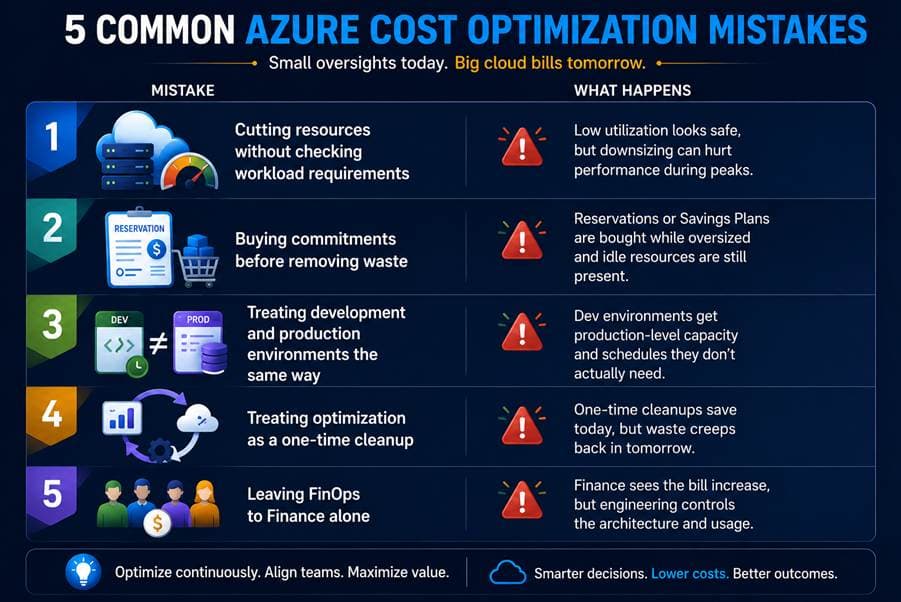
Common Azure Cost Optimization Mistakes That Keep Waste Hidden
The visual below summarizes the mistakes that often cause Azure waste to remain unnoticed, return after cleanup, or grow again over time.
What Good Azure Cost Optimization Looks Like After the Review
After the review, a well-managed Azure environment should show clear ownership, evidence-based decisions, and repeatable controls that prevent waste from returning.
- Cost ownership is clear: every major subscription, workload, and resource group has an accountable owner.
- Optimization decisions are evidence-based: changes are based on usage, dependency, performance, and business criticality—not only the monthly bill.
- Idle resources are reviewed regularly: unused disks, snapshots, IPs, test VMs, and abandoned resources are identified and actioned.
- Non-production environments follow schedules: development and testing resources run only when needed.
- Storage reflects actual value: data is tiered, retained, backed up, and replicated according to business and compliance needs.
- Commitments match stable usage: Reservations and Savings Plans are aligned to predictable demand after right-sizing.
- Governance prevents waste from returning: budgets, alerts, tagging, policies, and periodic reviews are built into cloud operations.
Where WinCap Comes In
WinCap helps enterprises turn Azure cost visibility into prioritized, safe cost-saving actions across workloads, architecture, governance, and FinOps.
Published WinCap case studies report outcomes such as a 42% reduction in annual cloud spend for one customer and a 35% reduction in infrastructure costs during a large Azure migration. Results vary by environment, maturity, and optimization scope.
If your Azure costs are growing faster than your controls, WinCap can help you find practical, safe opportunities to reduce waste.
Find Your Azure Savings Opportunities → Explore WinCap's Azure Services
Frequently Asked Questions (FAQs) on Azure Cost Optimization
1. How can WinCap help with Azure cost optimization?
WinCap helps with Azure cost optimization by assessing cloud spend, finding hidden cost drivers, prioritizing safe changes, and strengthening governance. This helps enterprises reduce avoidable waste without compromising performance, security, or business continuity.
2. How to optimize cost in Azure?
To optimize cost in Azure, map spending first, then reduce idle resources, right-size workloads, control non-production environments, optimize storage, use Reservations or Savings Plans carefully, and monitor usage through budgets, tags, alerts, and regular reviews.
3. How to manage costs in Azure?
Azure costs can be managed by using Azure Cost Management, setting budgets and alerts, applying consistent tags, assigning ownership, tracking usage trends, and reviewing spend regularly. The key is to make cost control a recurring operating practice, not a one-time cleanup.
4. What are the best tools for cost control in Azure?
The best tools for Azure cost control include Azure Cost Management, Azure Advisor, Azure Pricing Calculator, budgets, alerts, tags, reports, Reservations, and Savings Plans. These tools help monitor spend, identify waste, forecast costs, and improve purchasing decisions.
5. How to reduce cost in Azure?
You can reduce Azure costs by removing unused resources, shutting down idle non-production environments, right-sizing compute, optimizing storage tiers, cleaning up backups and snapshots, reducing unnecessary data movement, and applying commitments only to stable workloads.

.jpg&w=3840&q=75)
.png&w=3840&q=75)